
Unifii Mobile App
Your operations. Wherever work happens.
Put the power of Unifii Operations Cloud in the hands of your people. Access workflows, complete activities, capture evidence and stay connected, wherever work takes you.


Mobile first. By design.
Mobile first. By design.
Work doesn’t always happen behind a desk. Unifii Operations Cloud is designed with mobile users in mind. Forms, workflows and activities can be configured around the people completing the work and the environments they work in. From frontline workers and contractors to supervisors and senior leaders, everyone can participate in the same connected operational processes.

Powerful features at your fingertips
Everything your teams need to complete work, capture evidence and stay connected. Features depend on configuration, permissions and supported devices.
Capture work as it happens

Photo, video and file uploads
Capture photos and videos directly from your device, or attach existing images, documents and files to operational records.

Image markup
Annotate images to highlight hazards, defects and important details.

Digital signatures
Capture acknowledgements, approvals and signatures on your device.

Offline form capture and submission
Complete supported forms without connectivity and manage pending submissions when connectivity returns.

Location capture
Capture location automatically or in the background, where permissions and configuration allow, adding context and evidence to operational records.

Voice dictation
Use your device's built-in speech-to-text functionality to enter information into forms, reducing the need for manual typing.
Built around the mobile experience

QR and barcode scanning
Scan QR codes and barcodes using your device camera to connect physical assets, locations and equipment with digital information and workflows.

Integrated industrial scanners
Integrate with compatible Zebra barcode scanning devices for industrial and high-volume scanning.

Flexible device support
Access adaptive layouts across smartphones, tablets and desktop computers, with support for compatible ruggedised handhelds and intrinsically safe devices.

Push notifications
Receive configured alerts, reminders and escalations directly on your mobile device.

Biometric and PIN authentication
Support fingerprint recognition, Face ID and PIN-based authentication as configured.

Accessibility
Support native device accessibility features to provide a more inclusive and accessible experience for users with diverse needs.

Deep linking and native sharing
Share direct links to operational records using native device sharing, and open relevant forms and activities directly from links and notifications.

App version management
Notify users when new app versions are available and enforce minimum version requirements to maintain compatibility and security.

Mobile security and data protection
Protect organisational information on mobile devices through secure session management, configurable reauthentication requirements and local data protection, including offline data.
Built for your enterprise mobile strategy
Support enterprise mobile application management, authentication and deployment across company-issued, shared and personal devices, according to your organisation’s configuration and policies.
Our technology. Your brand.
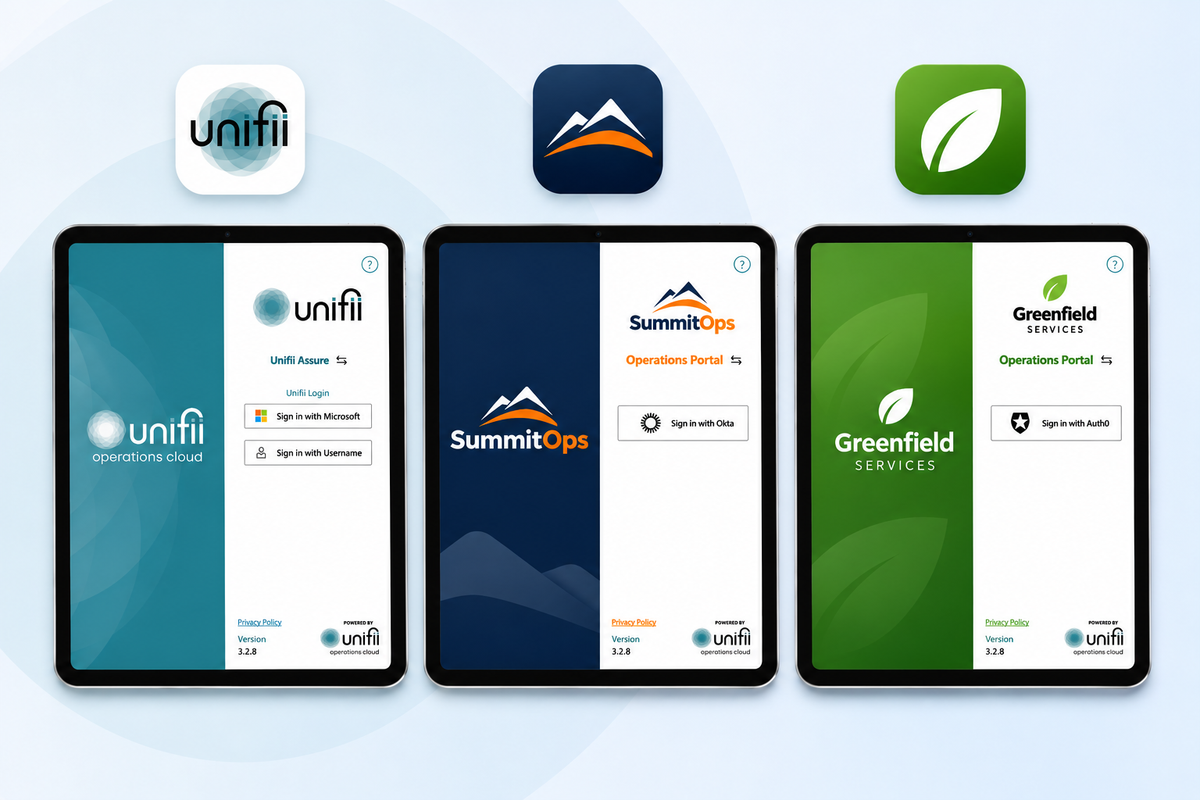
Our technology. Your brand.
Deliver a mobile application that looks and feels like part of your organisation.
Your corporate identity
Customise the application with your organisation’s logo, colours and application icon.
Your own app store presence
Release your branded application through your organisation’s own Apple App Store and Google Play accounts.
Your enterprise deployment strategy
Distribute and manage your application through supported enterprise mobile management solutions such as Microsoft Intune.
Work wherever work happens

Work wherever work happens
From remote sites and warehouses to offices and distributed workforces, your people need technology that fits their working environment. Supported offline forms let workers capture information without an internet connection and submit when connectivity returns. Access Unifii across supported Apple and Android phones and tablets, desktop computers and compatible specialist industrial devices.
Your organisation, your experience
Your organisation, your experience
A frontline worker, contractor, supervisor and executive can each have a different experience within the same connected platform.
Frontline workers
Complete assigned work, capture evidence, report hazards and access procedures.
Contractors
Access relevant inductions, permits and contractor requirements.
Supervisors and managers
Review submissions, approve work, manage actions and monitor team performance.
Executives and leaders
Access dashboards, performance information and operational insights.

Is the Unifii app free to download?
Yes. The app is free to download. Access to your organisation’s environment requires an authorised account.
How do I sign in?
Enter your company name and follow your organisation’s available sign-in options. Your company name can be found in your invitation email.
Can I use Unifii without an internet connection?
Supported offline forms allow information to be captured without an active internet connection and submitted when connectivity returns. Some features require connectivity.
Can I use Unifii on my computer?
Yes. Unifii Operations Cloud is also accessible through a supported web browser.
Do all users have access to the same features?
No. Available features depend on your organisation’s configuration, enabled solutions, device and assigned permissions.
Can I access Unifii Assure through the app?
Yes. Authorised Unifii Assure users can access their configured HSEQ planning environment through the Unifii Operations Cloud app.
Can we have our own branded app?
Yes. Unifii supports white-label applications customised with your organisation’s branding and distribution through your own app store accounts or supported enterprise mobile management solutions.
Who do I contact if I need help signing in?
Enter your company name in the app to view your organisation’s login options and administrator contact details.
Take Unifii with you
Download Unifii Operations Cloud for your Apple or Android device and connect to your organisation’s environment.

Download Unifii Operations Cloud for your iPhone or iPad.

Download Unifii Operations Cloud for your Android device.
Already have a Unifii account? Enter your company name and follow your organisation’s sign-in process. Your company name can be found in your invitation email.
Put operational capability in the hands of your people
See how Unifii Operations Cloud can connect your frontline workforce, operational processes and management teams through one configurable platform.